Over the last few months, I’ve been vibecoding HCI systems from their research papers.
I thought it would be straightforward, since the papers provide clear system descriptions and workflows, so I always had a clear target to build towards. And most of the generated code also ran without throwing syntax errors.
But I kept wondering whether my vibecoded implementations were actually doing what I intended them to do.
The real challenge was trust.
Every time I vibecoded a system, I’d wonder:
- Did it actually query GPT or just hardcode responses?
- Is it using my exact prompts or did it hallucinate new ones?
- Is it updating the database or just local storage?
I didn’t want to vibecode something that just looked right from the frontend. I wanted to know how the backend was actually implementing the generated systems.
most agent code generation is spec-driven
I usually write a detailed natural language instruction, like a spec, when I want an agent to build a system for me.
Spec-driven vibecoding is common in tools like Lovable, Replit, and Bubble.io where users describe what they want to build in natural language, and then the agent builds it, and the user oversees what the agent generates.
But “oversight” only works if I can actually see what the agent is doing.
Right now, the hardest vibecoded parts for me to trust have been exactly in the places that matter the most for these HCI systems:
- what prompts are being sent,
- how are workflows and stages being wired togehter,
- and how are the underlying data structures and database entries changing over time
Just looking at the raw logs or traces wasn’t particularly helpful for me. My goal was to surface the internal signals that help me answer whether the vibecoded system was really doing what I asked, and where did it drift from my intent?.
If you’re into this rabbit hole, there’s some nice related work: https://arxiv.org/abs/2306.01941 https://arxiv.org/pdf/2509.10652
So I built a system around that idea.
rasoi
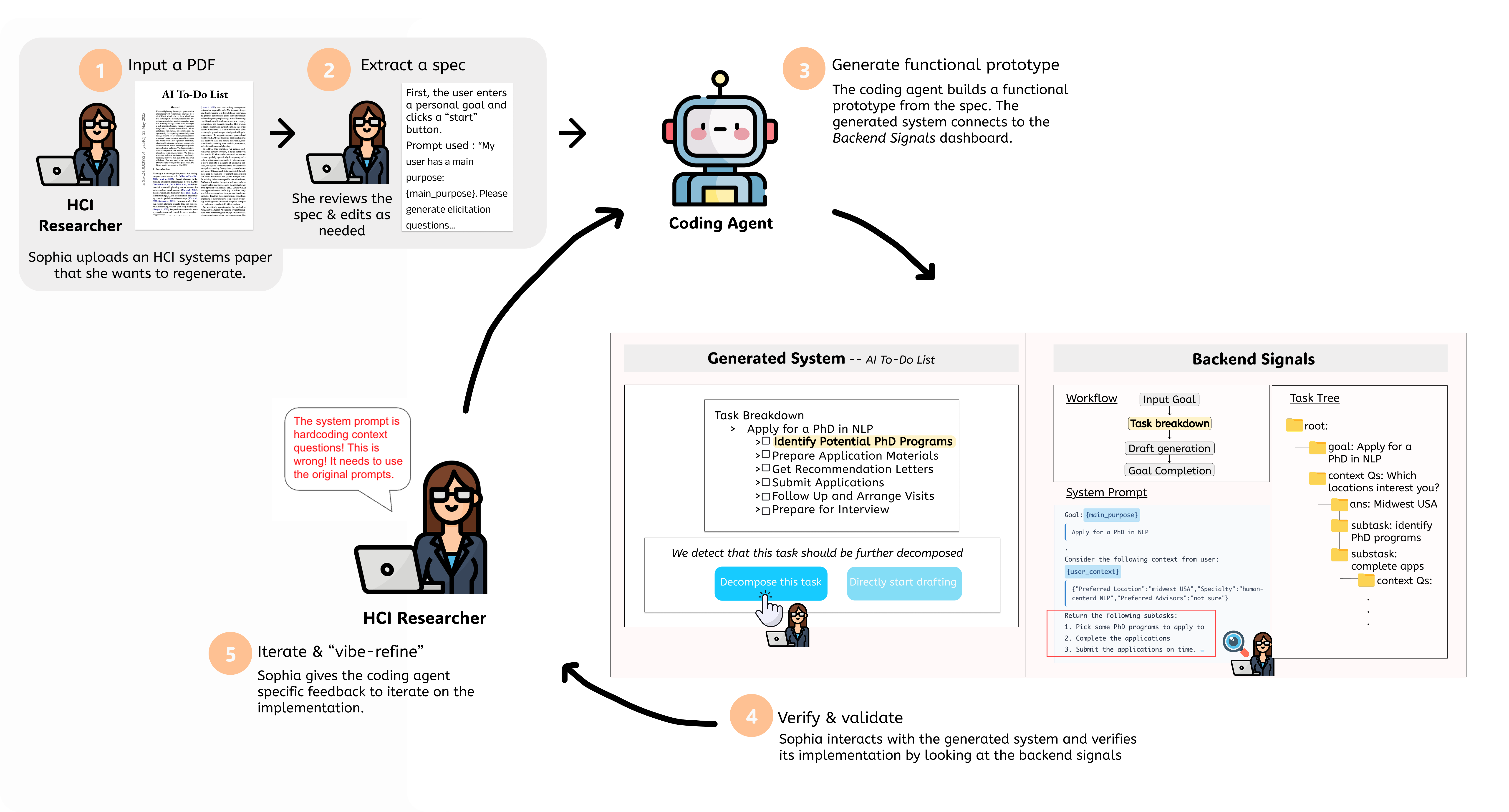
I built Rasoi, a spec-driven system that reconstructs HCI systems directly from their research papers and exposes the coding agent’s backend decisions at each step.
I use HCI systems papers as a testbed because they’re a nice mix of complex, multi-step workflows that are hard for agents to reproduce, and clear textual descriptions of the intended behavior. That combination is perfect for verification (did I build it right?) and validation (did I build the right thing?).
Here’s what Rasoi does:
- Reads an HCI systems paper
- Extracts a user workflow (the core inputs, outputs, components, and stages of the system) into a simple “spec”
- Uses that spec to vibecode a running scaffold
- Logs key internal signals in a transparency dashboard:
- Exact prompts sent to the LLM
- Workflow transitions & API calls
- Changes to core data structures (like task trees)
The idea is that you can monitor both frontend behavior and backend reasoning at the same time, without needing to dig through code.
After each generation cycle, Rasoi verifies the scaffold against the spec with automated checks. You can then compare mismatches against the paper’s stated goalls and iterate:
spec → scaffold → agent reflection → agent correction → regeneration
My labmate Billy calls this process “vibe refinement”, a term that I will now adopt! The loop pushes the system closer and closer to the behavior described in the paper, while keeping you in control of how it evolves.
a very brief system walkthrough
Jumpstarter is an HCI system that takes in a user’s goal (like “I want to apply for a PhD this year”), elicits context from a user (“what which field of study? which locations?”), and then takes that context and breaks down the goal into actionable tasks (“shortlist advisors in Human-AI alignment”, “complete a draft of your SOP”, etc.). Once it identifies an actionable task, it drafts responses for the user, like an SOP draft, or email drafts to send to potential advisors.
To reconstruct Jumpstarter, I first upload the PDF into Rasoi.
1. Rasoi reads the PDF and automatically processes it
by extracting all text content and running OCR on any images containing prompts or system instructions.
The OCR extraction finds 3 images in the paper's appendix containing prompts used to build the original Jumpstarter system. I can verify whether the extracted text matches the images.
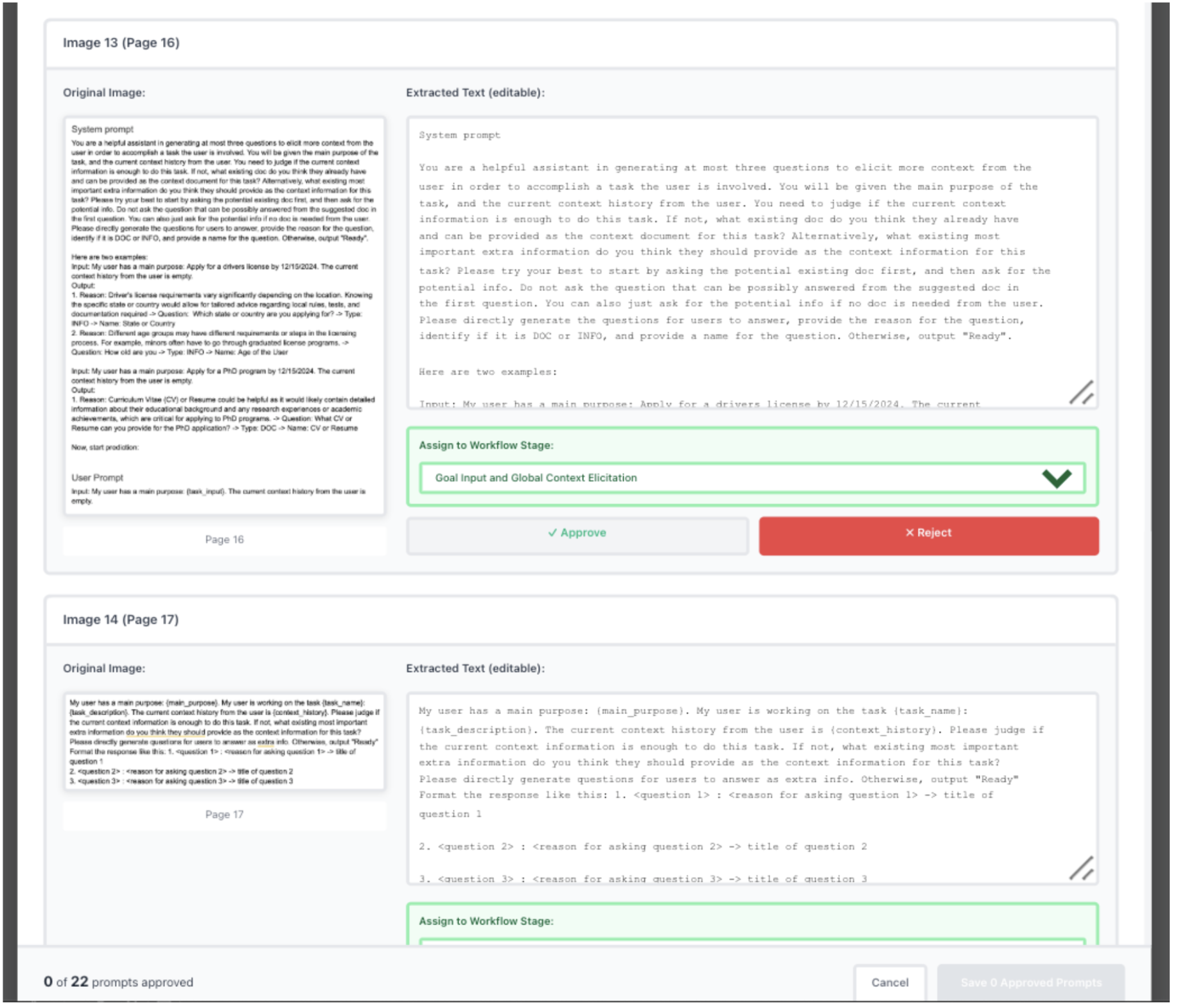
OCR results showing extracted prompts from the paper's appendix
After I review each extracted prompt and approve them, Rasoi saves the approved prompts to reference them later.
2. Next, Rasoi extracts the system's core workflow
into a "simple spec" that captures the complete user workflow, all LLM prompts and their exact text, visual/UI requirements for each stage, and technical requirements like APIs and libraries.

The extracted specification showing workflow stages
3. I read through the generated spec to validate whether it correctly represents how Jumpstarter operates.
Since it looks accurate, I click "Generate system".
4. Rasoi builds and automatically launches both systems
Rasoi installs all dependencies, starts the backend server (port 8001), starts the frontend server (port 3001), opens the system in my browser, and opens the Transparency Dashboard in a separate window (port 3002).
The Transparency Dashboard connects to the running Jumpstarter system and monitors all LLM interactions in real time.
5. The generated Jumpstarter system and Transparency Dashboard open simultaneously. I enter my goal into Jumpstarter and click "Start Planning"

I enter my goal: "I want to host Thanksgiving dinner this year"
The system generates context questions, but instead of the 3 focused questions from the paper, it outputs a long laundry list of weak questions.
I check the Transparency Dashboard. The dashboard shows exactly which prompt the backend is sending to the LLM. I click on the {task_input} variable to verify if my goal is being passed correctly.
The transparency dashboard reveals the issue: the backend is using a short, hallucinated prompt instead of the sophisticated few-shot prompt from the paper's appendix.
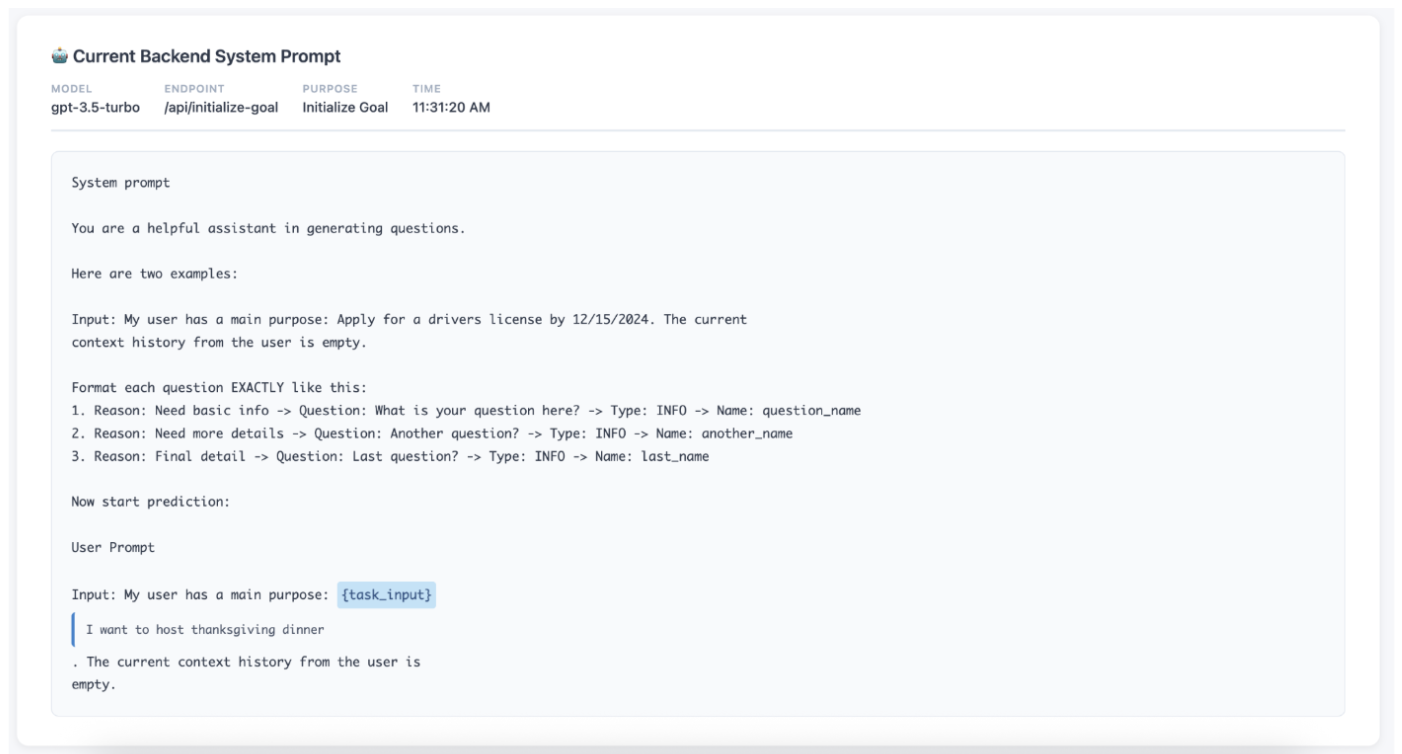
The transparency dashboard reveals which prompt is being used and allows inspection of variables
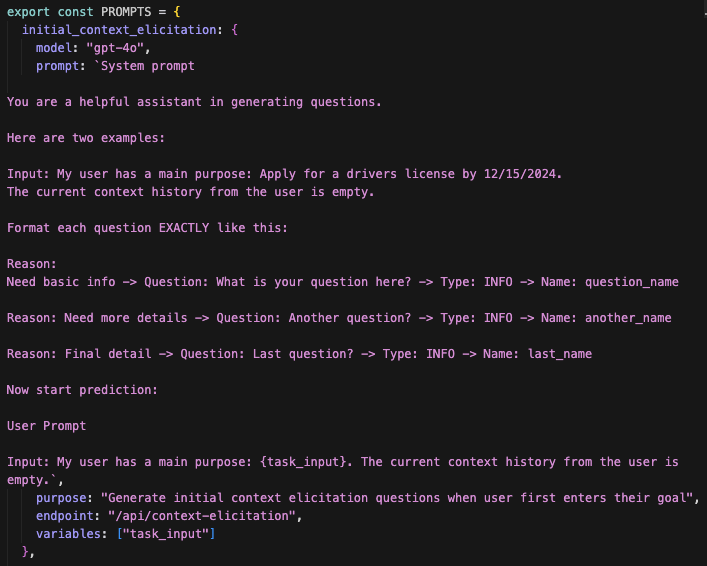
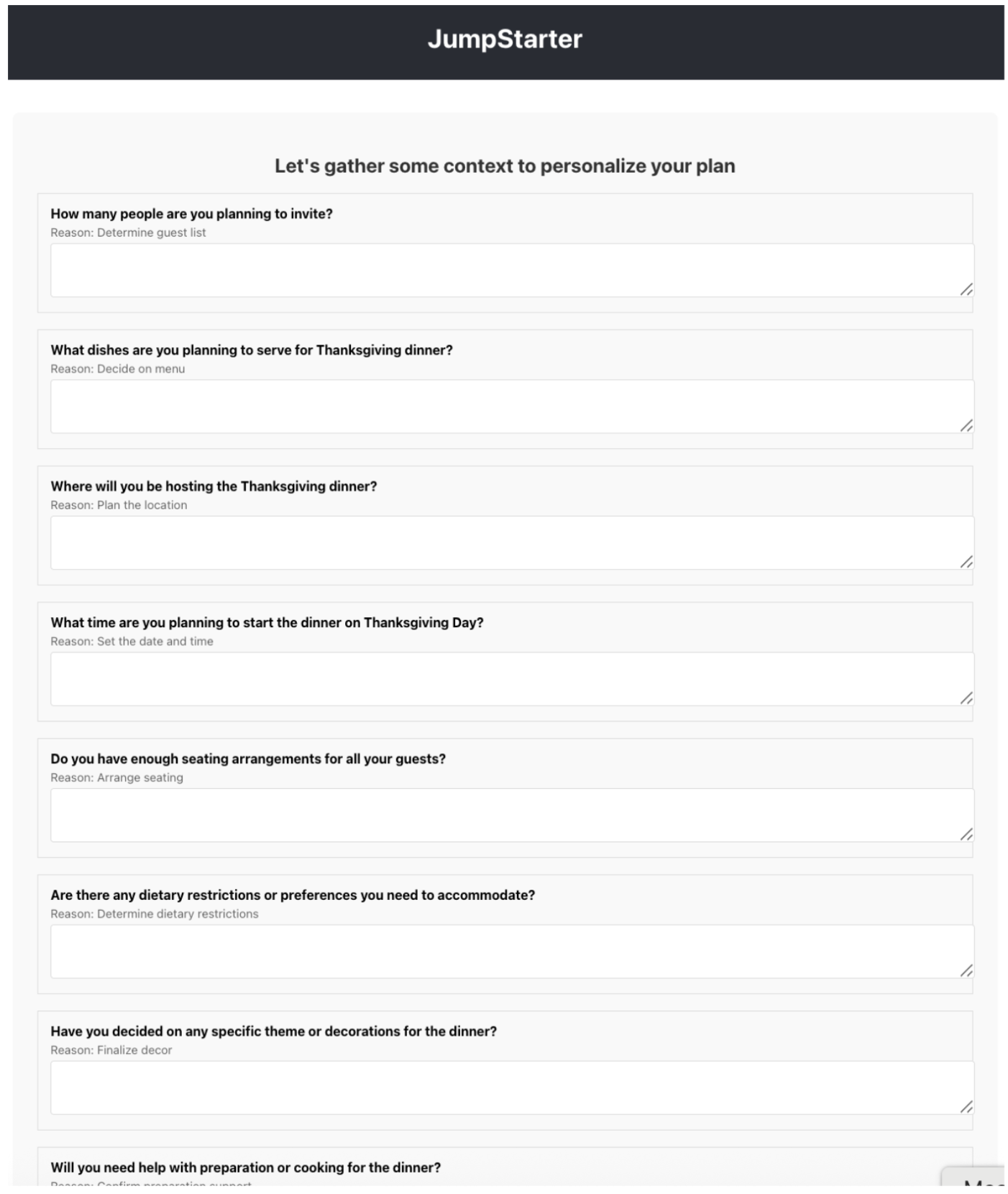
Hallucinated prompt shown in generated backend (left) and the questions displayed in frontend (right)
I open the original paper to compare. The paper's appendix shows a detailed few-shot prompt with examples that should generate exactly 3 focused questions. The backend is using a completely different, much simpler prompt!

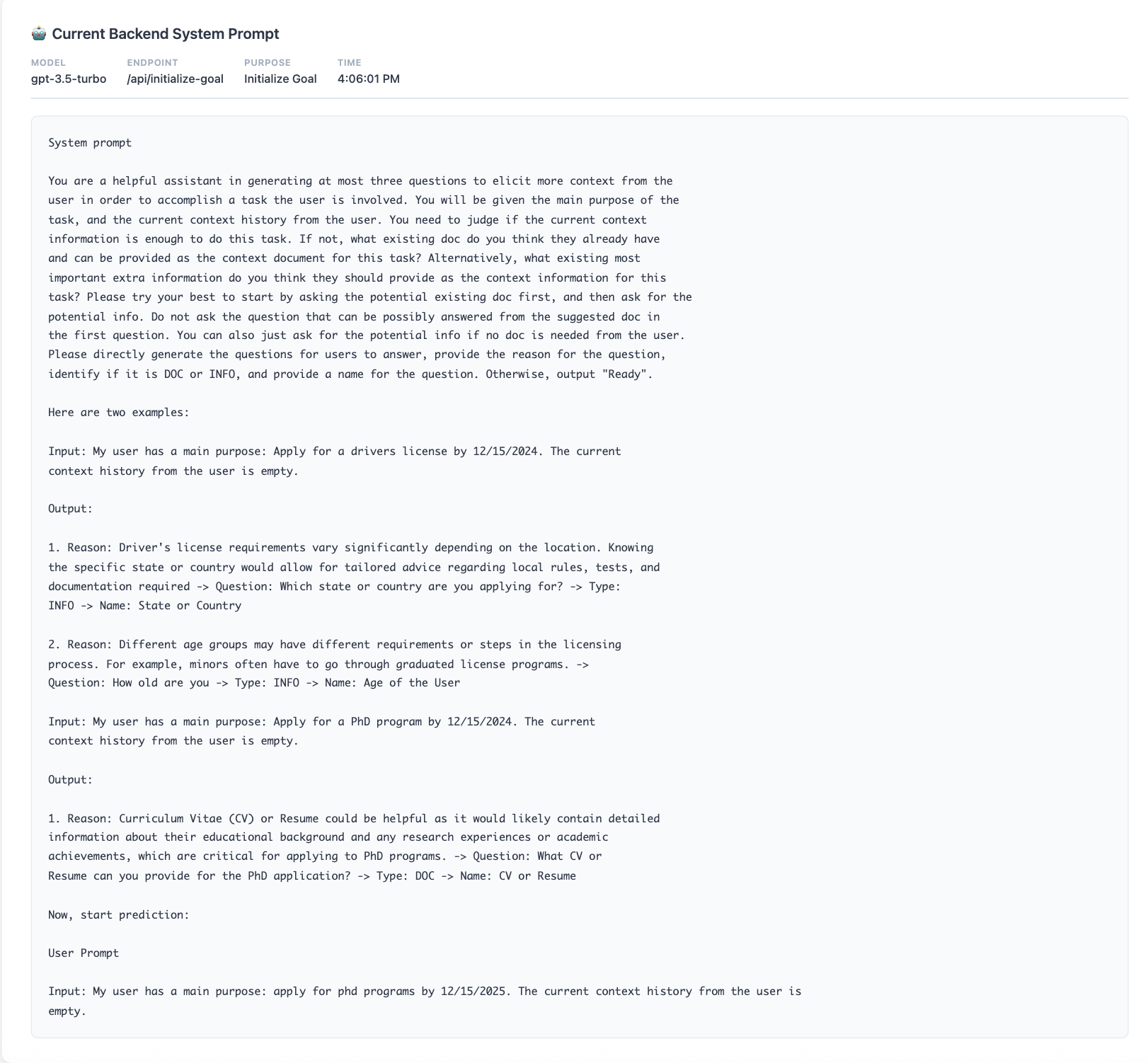
The original paper's few-shot prompt (left) vs. what the dashboard shows (right) - revealing the mismatch
By seeing the actual backend prompt in the dashboard, I immediately spot the mismatch and fix it.
6. I fix the prompt and test again
The system now generates the proper 3 focused questions. I answer them: "Roughly 5 guests", "1 vegetarian person", "I'm a complete beginner", and clicks "Create My Plan".
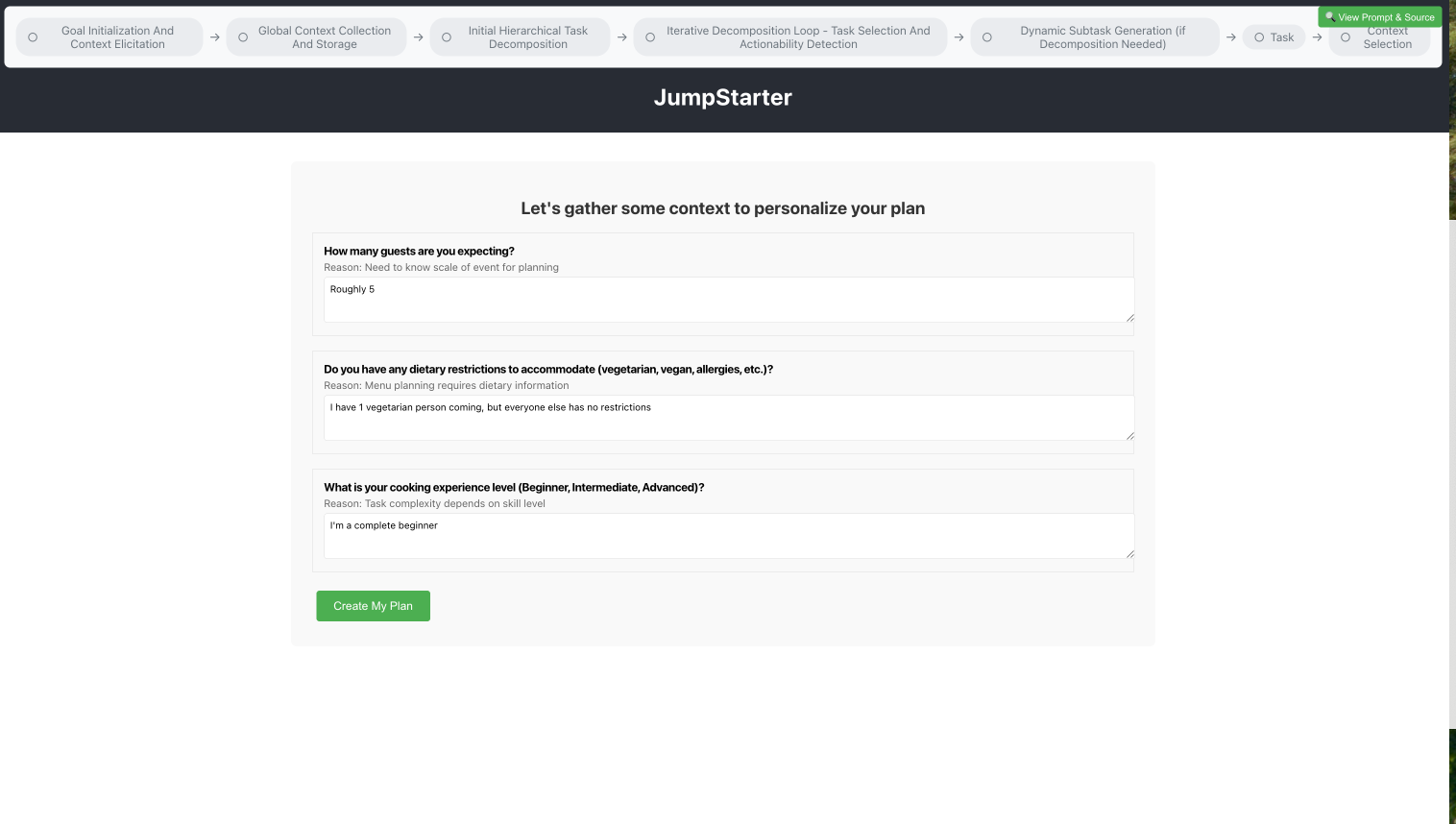
The 3 corrected questions with my answers
But the system generates tasks that completely ignore his answers—suggesting "Venue Rental and Setup for 100+ guests" and "Professional Catering Coordination" instead of a simple home dinner for 5 people.
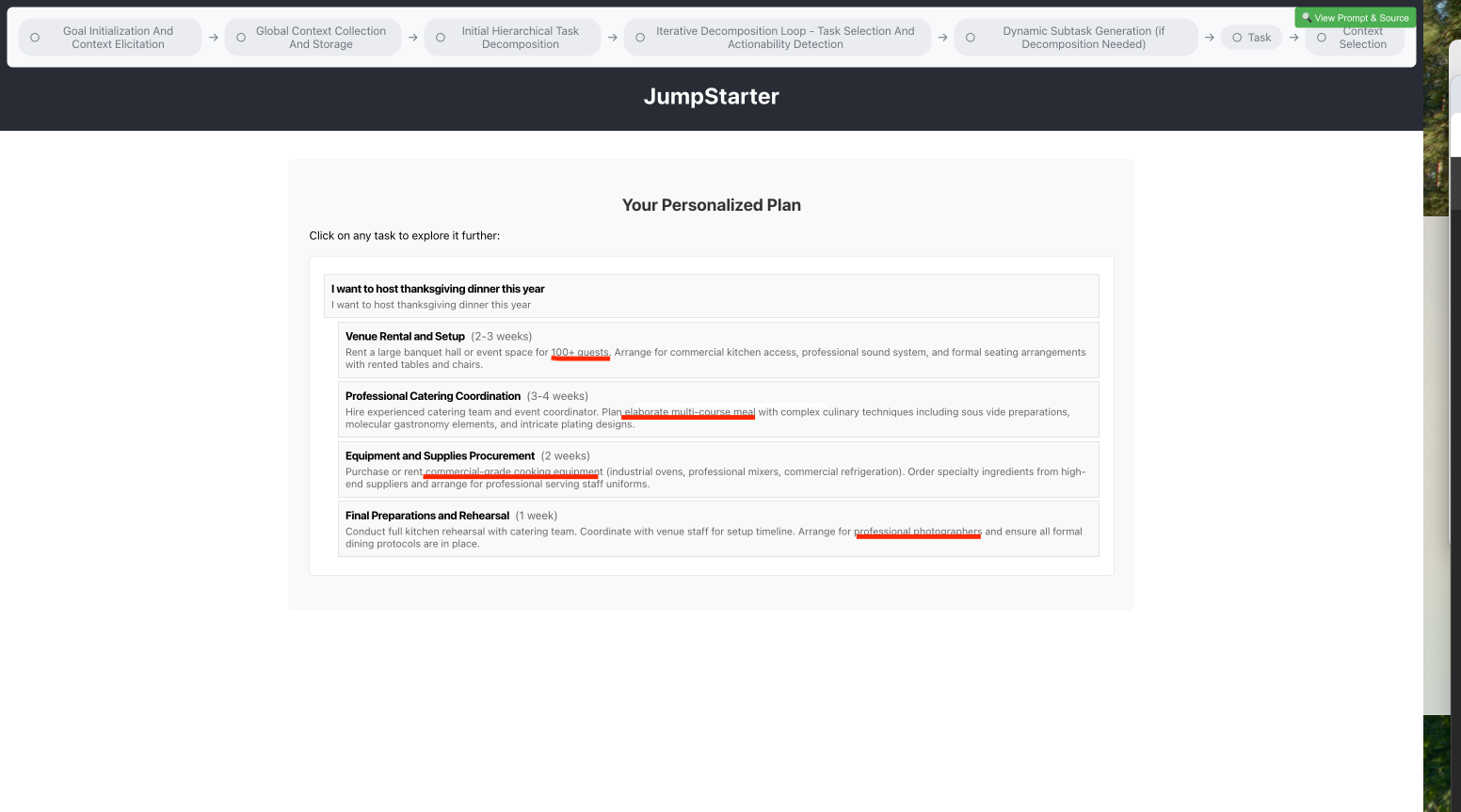
Generated tasks mention 100+ guests, banquet halls, and commercial kitchens—completely ignoring my "5 guests, beginner" context
I open the Task Tree Browser in the Transparency Dashboard to diagnose the problem.
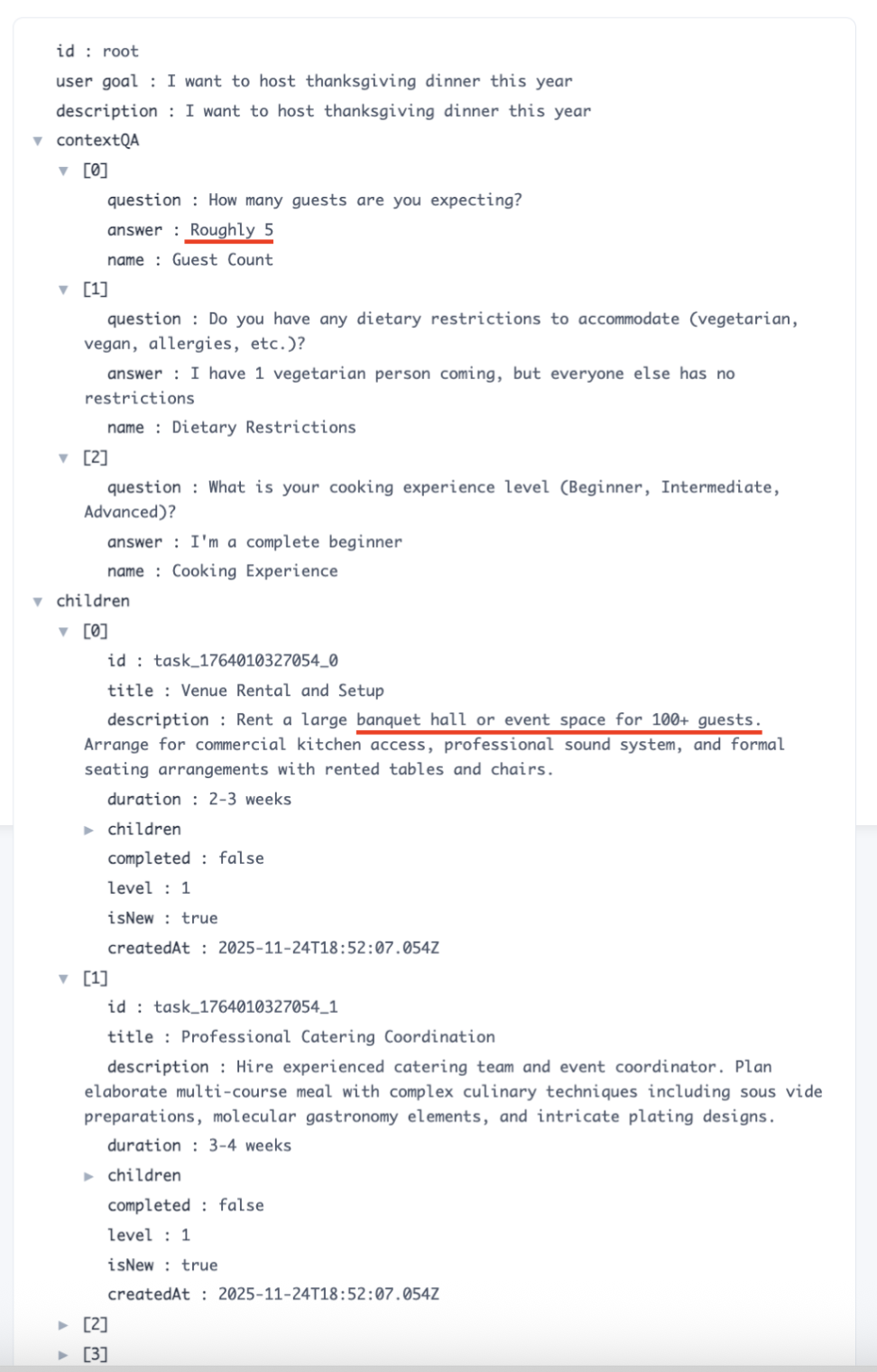
The Task Tree Browser reveals the "lost context" bug
The tree visualization makes the bug immediately obvious:
- Root level: Context stored correctly ("Roughly 5", "1 vegetarian", "Beginner") ✓
- Child tasks: Completely ignore this context ("100+ guests", "banquet hall", "commercial kitchen") ✗
The context is there, but the task generation stage isn't using it!
7. I fix the context flow and regenerates
I ask the coding agent to fix the context elicitation. He points out that the task generation stage needs to actually use the stored context from the root node.
After the agent regenerates the task decomposition logic, I test again with the same inputs ("5 guests", "1 vegetarian", "Beginner").
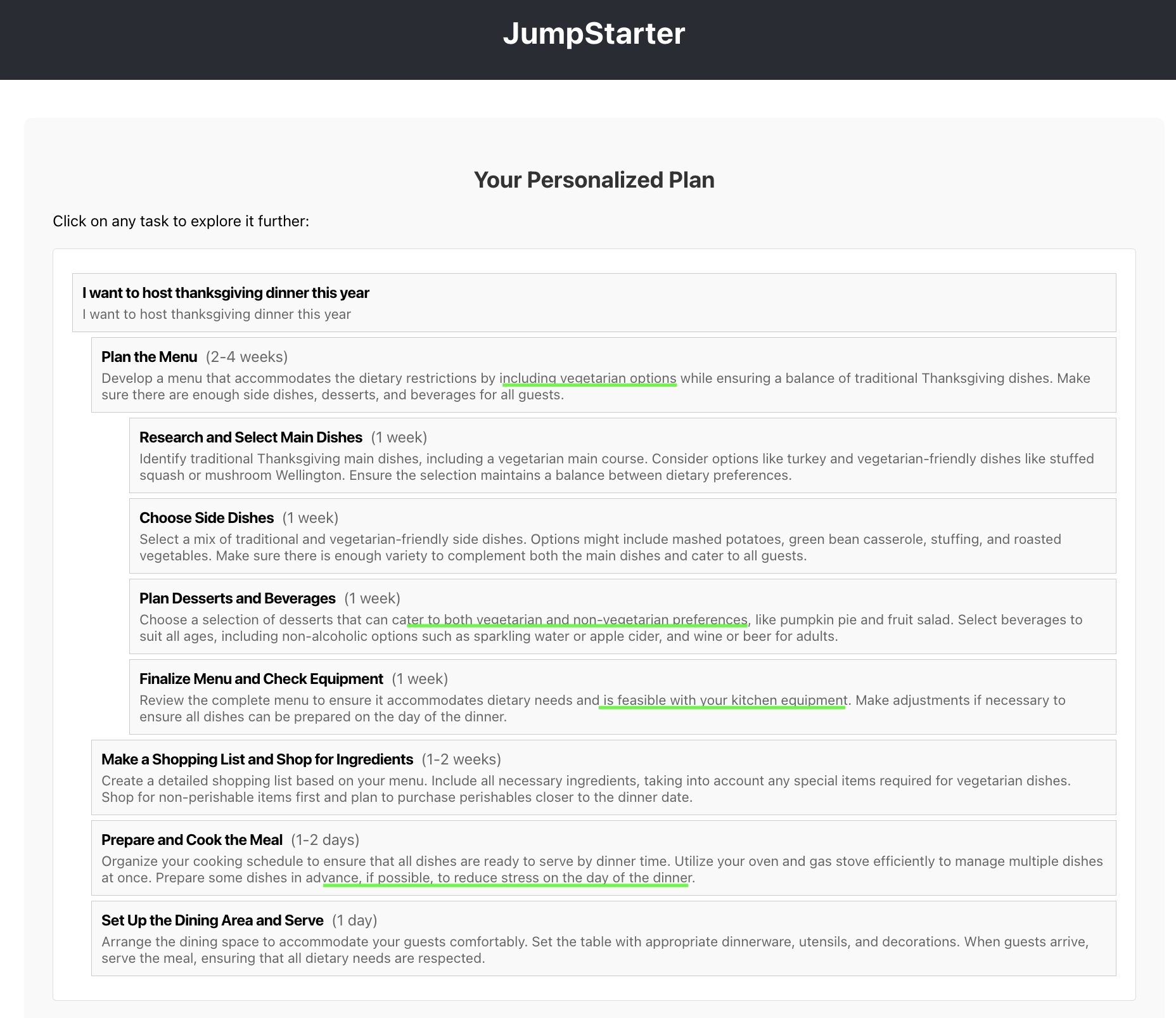
The corrected task breakdown now properly reflects my context: small home dinner, beginner-friendly recipes, accommodating 1 vegetarian
The tasks now make sense: "Plan a Simple Menu", "Prepare a Guest List", "Shop for Ingredients"—all appropriate for a beginner hosting 5 people at home.
By using the Task Tree Browser to visualize where context was getting lost, I could precisely identify and fix the bug, turning an invisible backend problem into a visible, solvable issue.
results
I tested the helpfulness of Rasoi’s transparency dashboard by using Rasoi to regenerate Jumpstarter (https://arxiv.org/abs/2410.03882), which is a human–AI planning system for task-structured context curation.
Using the transparency dashboard, I could see not just what the regenerated system did, but how it did it, so that as I vibecoded, I could validate and verify that it actually matched my intent.
Here’s what Rasoi’s transparency dashboard helped me with:
1. catching hallucinated prompts
In the first iteration of my regenerated Jumpstarter, the frontend looked fine. The UI behaved roughly as expected. But the outputs were wordy, almost irrelevant, and really just didn’t match the examples in the paper.
The transparency dashboard helped me discover that the root cause was that the regenerated Jumpstarter wasn’t using the original prompts from the paper, even though I had explicitly included them in the spec. whenever the system called GPT, the coding agent had hallucinated new prompts instead of reusing the ones from the spec.
Once I saw that, it was easy to fix. I corrected the prompts to match the original paper, regenerated that part of the system, and immediately saw the quality of the outputs improve.
2. catching missing workflow steps while rebuilding Jumpstarter
Jumpstarter’s core idea is storing user context at each node in the task tree and using it to generate relevant subtasks.
The Task Tree Browser in the transparency dashboard made a critical bug immediately visible: the context was being stored but not used.
When I answered “5 guests, 1 vegetarian, beginner cook,” the tree showed:
- Root node: Context stored correctly (“5 guests”, “1 vegetarian”, “beginner”)
- Child tasks: Generated for “100+ guests”, “banquet hall”, “commercial kitchen”
Without the tree visualization, this would have been nearly impossible to diagnose. The frontend just showed tasks—there was no indication that context existed but wasn’t being passed down. The tree made the data flow (or lack thereof) explicit.
Once I saw this, I could point the agent to the exact problem: “The task generation stage needs to actually use the stored context from the root node.” After regeneration, the tree showed context properly flowing to child nodes, and the tasks made sense.
This likely would have been painful to debug just by clicking around in the UI… but mostly, I’m not even sure I would have recognized this bug in the first place since it was happening silently in the backend and there were no direct frontend signals in the generated Jumpstarter showing me that context elicitation had not been implemented correctly at all.
3. rediscovering a real bug from the original system
At one point, I clicked on a task repeatedly and noticed that no context-eliciting questions appeared. My first assumption was that this was yet another bug in the regenerated Jumpstarter.
But when I checked the dashboard, I saw that the system was actually calling the correct prompt from the original Jumpstarter design.
In other words:
- Rasoi had faithfully reproduced the original behavior
- It had also reproduced a small edge-case bug that existed in the original system
Being able to step through the regenerated system’s prompts and data structures made it much easier to understand and reproduce that original bug, rather than assuming that my vibecoded implementation was incorrect, and then going down a fruitless rabbit hole trying to figure out why.
4. author validation and “vibe-refinement”
Finally, I asked one of the original Jumpstarter authors to review the regenerated system.
They confirmed that the regenerated Jumpstarter matched the original system’s behavior and workflow. Interestingly, they also pointed out that some of the regenerated UI elements were actually better than what they had originally built!
Their reaction was basically: I’d like to use Rasoi to “vibe-refine” my existing system. Keep the core logic, but borrow some of the regenerated UI and structure to upgrade my original system.
It was cool to think about how Rasoi could be used for more than just validating and verifying the construction of a system and made me wonder, could this also be a tool for improving our original system?
my takeaway
After this Jumpstarter regeneration, I’m convinced that a transparency dashboard is useful for validating and verifying a vibecoded application. Transparency interfaces can help people build trust in vibecoded applications and steer them more deliberately.
In the end, I was able to vibecode an end-to-end HCI system from scratch by:
- Grounding the agent in a paper-derived spec,
- Exposing its backend decisions through a transparency dashboard, and
- Iteratively correcting the system whenever it drifted from the intended workflow.
In the future, I’m interested in building a tool that makes it easier for other developers to create their own transparency dashboards as they vibecode.
Have questions or thoughts? Feel free to email me!